
Direct Answer
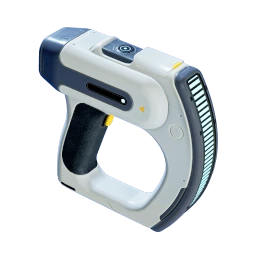
The path from Scanner to Habitat Builder follows five stages: gather basic resources, craft the Scanner, scan two degraded Habitat Builder targets, craft the Habitat Builder, and build a powered first base with a full Fabricator. This guide walks each stage in order.
Requirements
Before you start the Scanner-to-Habitat-Builder path, you need these tools and materials:
| Requirement | How to Get It |
|---|---|
| Survival Multitool | Craft at Fabricator — 3 Titanium |
| Basic Battery | Craft at Fabricator — 2 Copper + 2 Acidic Raion Pouches |
| Scanner | Craft at Fabricator — 2 Titanium + 2 Quartz + 1 Basic Battery |
| Habitat Builder (after unlock) | Craft at Fabricator — 2 Titanium + 1 Glass + 1 Basic Battery + 1 Copper Wire |
Where to Find Early Resources
- Titanium: Small gray rock nodes on the seafloor near the Lifepod. Metal Salvage (large metal chunks near wrecks) converts to 4 Titanium at the Fabricator.
- Quartz: Inside orange Coral Domes in the shallow starting area. Swim inside and look up — Quartz grows on the inner walls.
- Copper: On cave walls and ceilings near the Lifepod. Check the cave directly below the Lifepod and the larger cave system east of it.
- Acidic Raion Pouches: Cut from purple/green plants on the seafloor and in caves using the Survival Multitool.
Stage 1: Craft the Scanner
The Scanner recipe appears in the Fabricator immediately — craft it as soon as you have the materials.
Recipe
| Material | Count |
|---|---|
| Titanium | 2 |
| Quartz | 2 |
| Basic Battery | 1 |
Crafting station: Fabricator (Tools tab).
Craft Steps
- Open the Lifepod Fabricator.
- Navigate to the Tools category.
- Select the Scanner recipe.
- Confirm materials are available and craft it.
- Add the Scanner to your hotbar.
Stage 2: Learn to Scan
The Scanner lets you unlock blueprints by scanning objects in the world.
How Scanning Works
- Equip the Scanner from your hotbar.
- Point at a target — a blue scanning reticle appears when a scannable object is in view.
- Hold the scan button (right mouse button on PC) until the progress bar fills.
- Check your progress — a pop-up on the left side of the screen shows scan count vs. required count.
What to Scan
Most blueprints need 2–3 scans of the same object type. You can scan:
- Equipment fragments — broken tools and devices in ruins
- Structural fragments — base-building parts and wreckage
- Flora and fauna — unlocks Databank entries
- Story objects — terminals, black boxes, and NOA targets
Battery Management
The Scanner uses charge over time. Press R (PC) to open the charge menu and swap the depleted Basic Battery for a fresh one. Carrying a spare Basic Battery is recommended.
Stage 3: Find and Scan the Habitat Builder Fragments
The Habitat Builder blueprint unlocks after scanning two degraded Habitat Builder targets.
Where to Look
The primary early location is a ruined structure southeast of the Lifepod. A black cable running from the Lifepod toward the structure helps guide the way.
- First target: Near or inside a container at the structure entrance.
- Second target: Below the structure, through a lower opening or cave-like area.
Scan Checklist
- Equip the Scanner on your hotbar
- Search ruined buildings near the starting area
- Look for highlighted objects on the Scanner HUD
- Scan the first degraded Habitat Builder
- Find a second target in a different area
- Scan the second target
- Check the Fabricator — the Habitat Builder recipe should now appear
Each target can only be scanned once. You need two separate targets for a complete unlock.
Stage 4: Craft the Habitat Builder
After both scans are complete, the Habitat Builder recipe appears in the Fabricator.
Recipe
| Material | Count | Sub-Recipe |
|---|---|---|
| Titanium | 2 | — |
| Glass | 1 | 2 Quartz at Fabricator |
| Basic Battery | 1 | 2 Copper + 2 Acidic Raion Pouches |
| Copper Wire | 1 | 2 Copper at Fabricator |
Copper tip: The Habitat Builder needs a total of 4 Copper (2 for the Basic Battery + 2 for Copper Wire). Gather extra while you are in the caves.
Craft Steps
- Open the Fabricator.
- Go to the Personal or Tools category.
- Select the Habitat Builder recipe.
- Craft it and add it to your hotbar.
Stage 5: Build Your First Base
With the Habitat Builder equipped, right-click (PC) to open the build menu. You can now place base structures.
Recommended Build Order
This sequence gets you a powered base with a fully functional Fabricator as quickly as possible:
| Step | Structure | Materials | Purpose |
|---|---|---|---|
| 1 | Foundation | 2 Titanium | Stable platform with hull integrity |
| 2 | Corridor or Room | 2–5 Titanium | Your first livable space |
| 3 | Hatch | 1 Titanium + 1 Quartz | Exterior entrance |
| 4 | Solar Panel | 1 Titanium + 2 Quartz | Daytime power (mount on top) |
| 5 | Fabricator | 1 Titanium + 1 Copper + 1 Quartz | Full crafting station (place inside) |
| 6 | Wall Locker | 2 Titanium | Storage (takes no floor space) |
What the Full Fabricator Unlocks
The base Fabricator is a fully functional crafting station. It removes the Lifepod’s crafting restrictions, giving you access to the complete recipe list — including the Processor for ingots, advanced materials, and vehicle progression.
Power Notes
- One Solar Panel is enough to keep life support and a Fabricator running during the day.
- Solar panels stop working at night. Add more panels or plan for an alternate power source (such as a hydroelectric turbine in a nearby ocean current) for 24-hour power.
- Place solar panels on the top or side of your base where they are exposed to light.
Common Mistakes
- Skipping the Survival Multitool — You need it to harvest Acidic Raion Pouches and Fibrous Pulp. Craft it before the Scanner.
- Only scanning one Habitat Builder fragment — Both scans are required. If the recipe has not appeared, find and scan the second target.
- Not bringing enough Copper — The Habitat Builder alone needs 4 Copper total. The first base Fabricator needs another Copper. Gather at least 5 Copper before returning to craft.
- Building too far from resources — Place your first base near Titanium nodes, Coral Domes, and cave entrances within return range of the Lifepod.
- Forgetting a Hatch — You cannot enter a sealed room without one. Always build a Hatch on an exterior wall.
- Placing the Fabricator without power — The Fabricator only works in a powered base. Build a Solar Panel first.
Next Steps
Once your first base is powered and equipped with a Fabricator, your next goals are:
- Craft a Processor for ingots and advanced materials
- Build a Scanner Station to track nearby resources
- Explore the Lifepod-area caves for Silver — needed for the Standard Air Tank and Wiring Kits
- Follow NOA missions from your Lifepod for story progression and new unlocks
See the Beginner Guide for a complete overview of the early game, including food, water, air management, and the full tool progression.